
ARI (Auto Repair Software)
uMob LTDAuto & Vehicles
4.3332.00 Reviews
- Version
- 16322.0.0
- Installs
- 100.00K
- Age Rating
- Everyone
Screenshots

Our Review of ARI (Auto Repair Software)
 Analysis by Appyee
When repair work piles up, the hard part is often not fixing the vehicle but keeping jobs, parts, customer details and paperwork moving together. I find that’s the problem ARI (Auto Repair Software) is meant to tackle: it gives a small repair business a place to organize its day rather than relying on scattered notes and memory. It’s an auto and vehicle app from uMob LTD, and its appeal is practical rather than flashy. I’d consider it most useful when a shop wants one working routine for service jobs and documents, but still needs to judge whether a phone or tablet is comfortable for longer admin sessions.
Getting Started with ARI
First things first, downloading ARI (Auto Repair Software) was a breeze. Available for both Android and iOS, it took me just a few taps to get it installed. The interface is straightforward, and setting up my shop's details was surprisingly simple. You know that feeling when you’re setting something up and it just seems to flow? That’s what it felt like with ARI.
Features that Stand Out
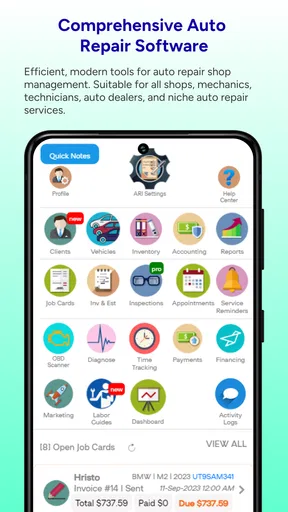
Where do I even begin? This app is packed with features tailored for auto repair shops. Here are a few that really caught my eye:
- Job Management: Creating and managing jobs is seamless. You can track every repair order from start to finish, which is a lifesaver when you have multiple cars in the queue.
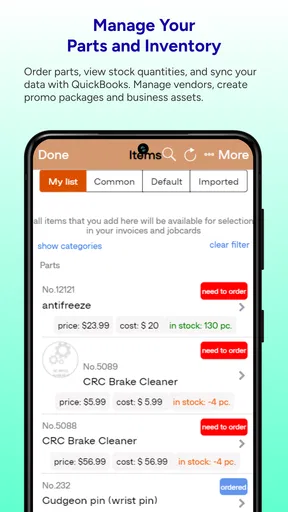
- Inventory Control: Keeping tabs on parts and supplies is no longer a headache. The inventory tracking feature is intuitive and helps prevent those awkward "Sorry, we’re out of stock" moments.
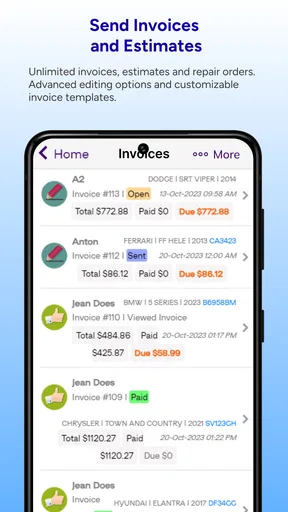
- Estimates and Invoices: ARI allows you to whip up professional estimates and invoices in no time. It even has customizable templates which gives your documents a personal touch.
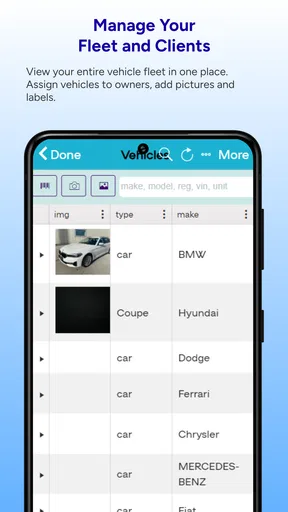
- Customer Management: Storing customer information and keeping track of their service history is a piece of cake. It’s super convenient for building relationships with repeat customers.
A Busy Shop’s Workflow
The strongest reason to consider ARI is that its parts are connected by the same repair job. A shop can start with a customer and vehicle, record the work, prepare an estimate, and move toward an invoice without treating each step as an unrelated task. That continuity matters when the phone rings while a technician is diagnosing another vehicle. Instead of reconstructing the conversation later from scraps of paper, the person handling the front desk has a clearer place to return to.
For example, imagine a customer drops off a car before work and asks for a call before any extra repairs are approved. I’d use the job record as the working reference, note what needs attention, and prepare an estimate before the conversation moves on to billing. The practical benefit is not that the app makes the repair decision; it’s that it can help keep the customer’s request, the proposed work and the eventual paperwork associated with the same job. A shop still needs a clear approval routine, but software can make that routine easier to follow.
There’s also a useful distinction between recording a part and keeping a reliable inventory. Inventory tracking can help staff notice when stock is low, but it only stays meaningful if someone updates it when parts arrive, are used, returned or found unsuitable. I’d treat the inventory screen as a shared shop habit, not an automatic substitute for checking a shelf. That small discipline is especially worthwhile for common consumables, where a missed count can interrupt a repair at the worst time.
Where the Time Savings Really Come From
Okay, so here’s the thing. I’ve tried a bunch of management apps before, but ARI is different. It’s not just about managing tasks; it’s about making the whole process efficient. The app’s ability to integrate with other tools and its cloud-based nature means you can access your data from anywhere. Whether you’re in the shop or on a coffee break, your business is literally at your fingertips.
For me, the realistic payoff is less about tapping faster and more about avoiding repeated admin. Customer history can help when a returning driver describes a previous issue vaguely, while reusable document templates can save time when the shop regularly prepares similar estimates. I’d still review every line before sending an estimate or invoice: a polished document is only useful if its parts, labor and customer details are correct. The app can organize the process, but the shop’s own checks remain essential.
This is also where ARI differs from the usual alternatives. A notebook and spreadsheet cost little to begin with and can suit a solo mechanic with only a handful of jobs, but they depend heavily on one person remembering where everything was written down. A general-purpose task app can track to-dos, yet it does not naturally center the workflow on repair jobs, parts, estimates, invoices and customer service history. ARI’s advantage is that those shop-specific tasks sit together; its trade-off is that a business must learn and maintain a more structured system rather than improvising its own.
Speed, Stability and Busy Periods
For day-to-day use, I’d expect the biggest difference in perceived speed to come from how consistently a shop enters information, not from rushing through screens. If the customer and vehicle details are already organized, opening a job and moving to an estimate should feel more direct than searching through separate records. If staff leave updates until the end of a shift, the same system can feel like extra paperwork. A short entry while the details are fresh is often the better trade-off.
Heavy use exposes a different challenge: interruptions. A front-desk worker may be switching between a walk-in, a call about a part and a customer asking when a car will be ready. In that setting, keeping one job record current is more valuable than trying to capture every detail perfectly in one long session. I’d use concise notes during the rush, then check the estimate and invoice carefully before they go to the customer. That approach reduces the chance that a hurried entry becomes a billing mistake.
ARI is free to download, though in-app purchases are available, with listed items ranging from $3.99 to $399.99. I’d try the free app with a small, representative set of jobs before deciding whether paid options fit the shop’s workflow. That means testing a routine repair, a job involving parts, a repeat customer and the documents the business actually sends. A real trial like that is more informative than judging a software purchase by its feature list alone, and it helps avoid paying for capabilities the team won’t use.
Reliability and the Human Checks That Matter
Cloud access is useful when the person answering a customer’s question is away from the desk, but it also makes dependable shop habits important. I would not assume that any software removes the need for a backup process or careful recordkeeping. Staff should know who is responsible for updating a job, and they should confirm that changes are saved before moving on to the next customer. If a shop already has a procedure for handling a busy day or a device interruption, ARI should fit into that procedure rather than replace it.
The same care applies to customer history. It can support a more personal conversation when someone returns, but only if entries are clear enough for another staff member to understand. A quick note such as the customer’s concern and the work discussed is more useful than shorthand only its author can decode. This is a small operational tip, but it can make a shared system feel dependable across shifts and reduce the awkwardness of asking a customer to repeat information.
Support is another part of the experience. Another huge plus is the support team. If you ever hit a snag, they’re just a call or email away. They’re friendly, knowledgeable, and super quick to help out. It’s like having an extra team member who knows the ins and outs of the app.
Device Fit and Who Should Choose It
ARI runs on Android with a minimum operating system requirement of 6.0, and it is also available for iOS. It is rated for Everyone. The version identified as current is 15821.0.0, and the app has been available since December 21, 2016. These details make it easier to judge whether an existing Android device is a candidate, but compatibility alone does not settle whether it will be pleasant to use throughout a workday. I’d test the screen and typing comfort on the device staff plan to use, particularly for writing estimates and reviewing invoices.
The app has a 4.3 average from around 1.3 thousand ratings, with over 100 thousand installs. Those figures suggest it has reached a meaningful group of users, but they cannot tell a shop whether its own workflow will fit. I’d recommend a practical trial before moving every active job into a new system, especially if several staff members need to use it consistently. A gradual start gives the team room to settle on naming conventions for jobs and notes before those habits become harder to change.
ARI looks like a better fit for independent repair shops and small teams that want customer records, job tracking, inventory and billing documents in one automotive-focused tool. It may be less suitable for a mechanic who only handles occasional work and is content with a notebook, or for a business that needs a desktop-first setup and extensive administrative controls. If the shop’s existing system already connects its repair records and invoices smoothly, switching may add training work without enough benefit. I’d choose ARI when scattered records are causing avoidable confusion, not simply because a dedicated app sounds more modern.
Wrapping It Up
In a world where time is money, ARI (Auto Repair Software) is like having a personal assistant for your auto repair shop. It handles the nitty-gritty details so you can focus on what truly matters—providing top-notch service to your customers. If you’re looking to streamline your operations, reduce errors, and boost productivity, I’d say give ARI a shot. It’s an investment in efficiency that pays off in spades.
Ready to transform your auto repair business? You can download the app from the links provided on our website and start your journey towards a more organized and efficient shop today. Trust me, once you get the hang of it, you’ll wonder how you ever managed without it.
My performance verdict is measured: ARI’s value is in keeping repair-shop information connected, rather than promising that every task will happen instantly. How smooth it feels will depend on the device, how regularly the team updates jobs and whether the workflow suits the shop. I’d start with a few real repairs, check the paperwork carefully and see whether staff can keep records current during interruptions. If that trial cuts down on searching and duplicated entry, it has earned its place; if the system becomes another chore, a simpler approach may serve the business better.
Verdict
Strengths of ARI (Auto Repair Software)
- User-friendly interface simplifies navigation.
- Comprehensive database of auto parts.
- Real-time updates enhance accuracy.
- Seamless integration with existing tools.
- Customizable reports for detailed analysis.
Limitations of ARI (Auto Repair Software)
- Limited offline functionality.
- Some features require premium access.
- Occasional syncing issues reported.
- Customer support response can be slow.
- Initial setup can be time-consuming.
Similar Picks in This Category
View All
Android Auto
Google LLC4.1

maxim — order a taxi & food
PT. SITO4.7

Штрафы ГИБДД: проверка с фото
Pays LLC – Штрафы ГИБДД4.7

Номерограм – проверка авто
Авто Ассист4.8

Дром Авто
Дром4.9

Frequently Asked Questions
What features does ARI (Auto Repair Software) offer?
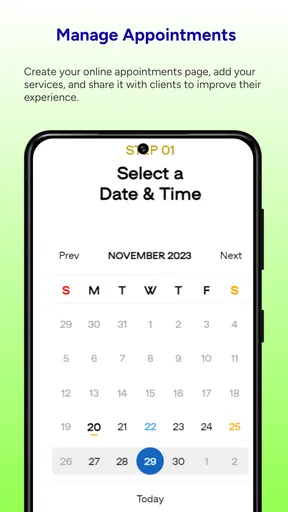
ARI provides a comprehensive suite of tools designed for auto repair shops. It includes features such as invoicing, appointment scheduling, inventory management, and customer relationship management (CRM). Additionally, it offers reporting and analytics to help shop owners track performance and make data-driven decisions.
Is ARI compatible with both Android and iOS devices?
Yes, ARI is available for both Android and iOS platforms, ensuring a wide range of device compatibility. Users can seamlessly access the app from smartphones or tablets, allowing them to manage their auto repair business on-the-go with ease and efficiency.
Does ARI offer a free trial for new users?
ARI typically offers a free trial period for new users to explore its features and assess its suitability for their business needs. This allows potential customers to experience the app's functionalities without any initial financial commitment, helping them make an informed decision.
How user-friendly is the ARI interface?
ARI is designed with user-friendliness in mind, featuring an intuitive interface that simplifies navigation. The app offers step-by-step guides and support resources to assist users in maximizing its features, making it accessible even for those who may not be tech-savvy.
What kind of customer support does ARI provide?
ARI offers robust customer support, including email and live chat options, to assist users with any issues or questions. The support team is known for being responsive and knowledgeable, helping to resolve concerns promptly and enhancing the overall user experience.
